Help Center / Speakers
Managing Speaker Profiles
Edit, delete, and organize speakers
Manage your speaker database from the Settings page.
Viewing Speakers
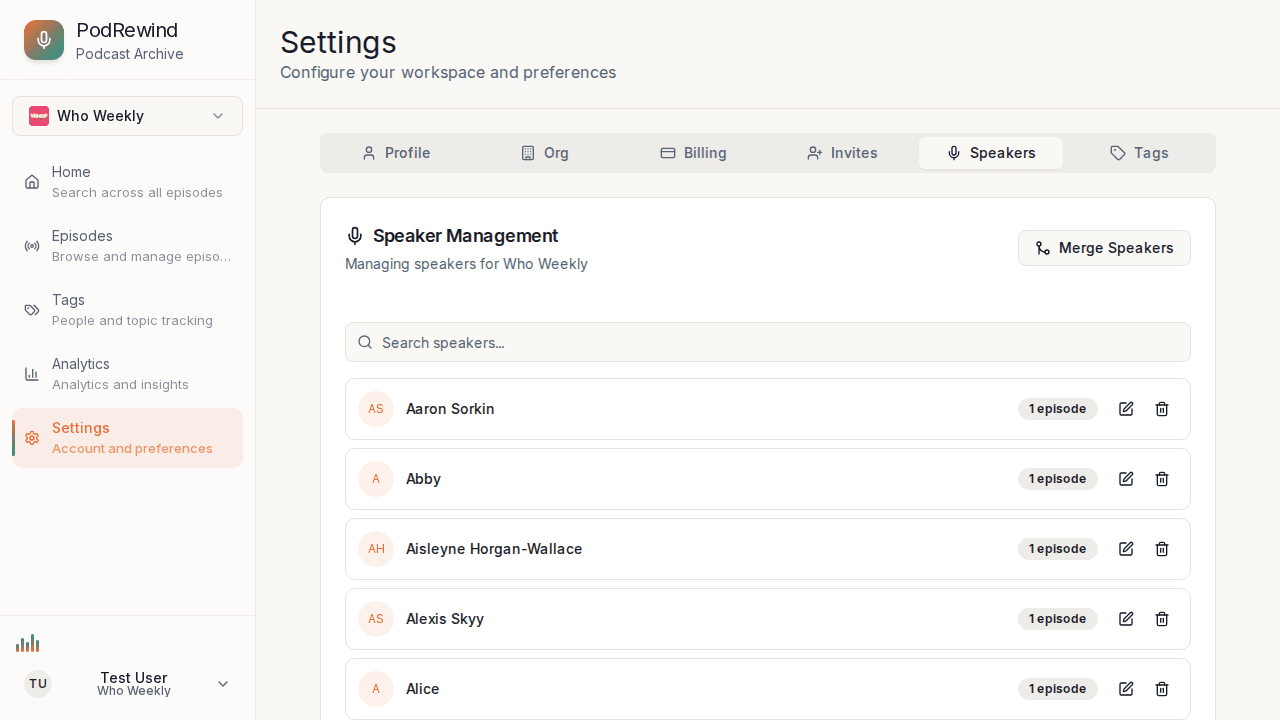
Access speaker management:
- Go to Settings
- Click the Speakers tab
- View all speakers in your organization
Editing Speaker Details
For each speaker you can edit:
- Name - Display name in transcripts
Click the edit icon next to a speaker's name to rename them. The change applies immediately across all transcripts.
Deleting Speakers
To delete a speaker:
- Find the speaker in the list
- Click the trash icon next to their name
- Confirm the deletion in the dialog
Note: Deleting a speaker removes them from all transcript segments.
Speaker Information
Each speaker entry shows:
- Number of episode appearances
- Aliases (if merged from other speakers)
What's Next?
- Merging Duplicate Speakers - Combine duplicates
- Filters and Sorting - Filter by speaker